CloudairyCloudairy
Cloudairy
Templates
Get startedBuildArtifactsAgentsConnectAdministerHelp
Artifacts
CanvasCreate a canvasA tour of the canvas editorShapes, lines and iconsSticky notes, text, drawing and framesWidgets in More toolsFlowcharts, mind maps, UML and cloud diagramsPresent, comment and restore versionsImport and export a canvas
WhiteboardRun a workshop on a whiteboard
ERDBuild tables and relationshipsImport a schema and export SQL
DocsA tour of the doc editorWrite with blocks and the slash menuTables and databasesEmbeds, views, charts and layoutsComments and suggested editsImport, export and version history
WikiStart a wikiSpaces, groups and pagesSite structure and navigationCustomize your wikiPublish your wikiPreview the reader viewChange requests, Extend, Analyze and Improve
ProjectsThe project pageCreate a task boardBoard viewsThe Main Table and columnsTask cardsOverview, automations and board settings
FormsBuild a formDesign and settingsShare a form and review results
DashboardsBuild a data dashboardBuild a project dashboard
SitesBuild a siteEdit your siteSite settings and publishing
CodeWork with a code project
SlidesBuild a deckEdit and restyle a deckPresent and download a deck
InfographicsMake and edit an infographicResize and export an infographic
WireframesMake and edit wireframes
ClipsRecord a clipEdit a clip and its transcriptShare a clip and its settings
Artifacts›Wiki
View as Markdown View this page as plain text

Preview the reader view

See your wiki the way readers will, on desktop and phone, and learn the actions readers get on every page.

Open the preview

In the wiki sidebar, click Preview, or use the Preview switch in the header.

Switch between desktop and phone, and between light and dark.

Click a space tab, open a page from the page tree, or use Search docs (Cmd/Ctrl+K).
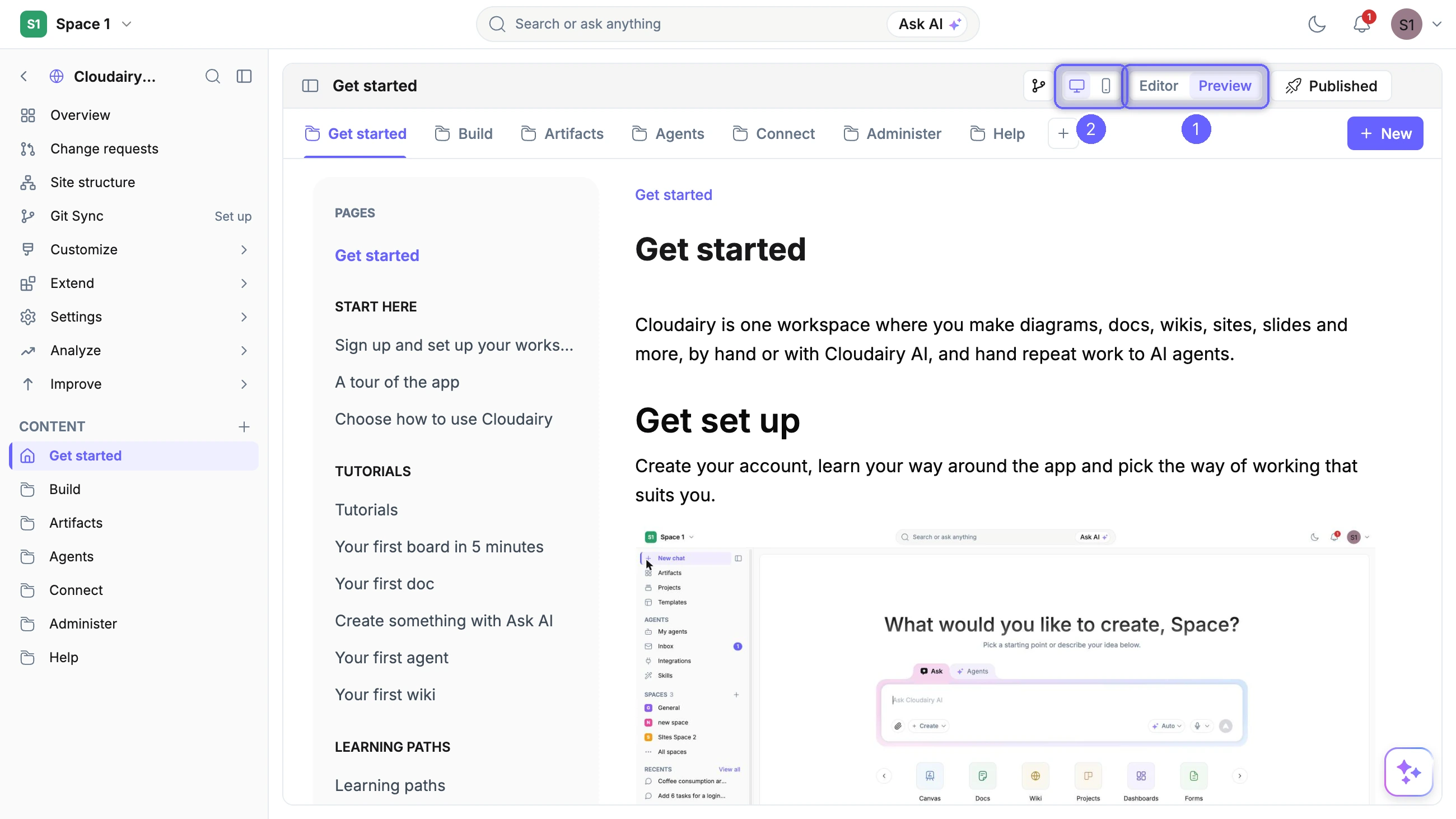
The reader preview
1 Switch between Editor and Preview, 2 preview as desktop or phone.

On a phone the navigation opens as a drawer, and an Ask button opens the assistant.

Page actions for readers

Action What it does
Assistant Ask the wiki's AI assistant
Copy page Copy the page text
View as Markdown Show the page as Markdown
Open in ChatGPT, Claude or Perplexity Ask an AI app about the page
Connect with MCP, VS Code, Cursor, Claude Code, Codex Use the docs from AI coding tools
Export as PDF This page, or the whole wiki as a .zip

Each page also has an ON THIS PAGE list of its headings.

Next steps

  • Publish your wiki
  • Customize your wiki

Last updated November 26, 2026

Was this helpful?
PreviousPublish your wikiNextChange requests, Extend, Analyze and Improve
On this page
Open the previewPage actions for readersNext steps
Was this helpful?
© 2026 Cloudairy

Product

CloudairyTemplatesPricing