

AI credits
AI credits are what Cloudairy AI spends when it writes, draws or plans for you, including every agent run; your workspace gets a fresh allowance every month.
What uses credits
- Building an agent with the agent builder, and changes you ask for on its design canvas.
- Every agent run: chats, Try now, and scheduled and triggered runs.
- Ask AI prompts and follow ups.
- AI on a canvas, in a doc or in any other editor.
How many credits a request uses depends on how much work it is and which model does it. Lighter models use fewer credits. See Choose an AI model.
When someone else runs an agent you shared, the run uses their credits, not yours.
How many credits you get
| Plan | AI credits a month |
|---|---|
| Free | 100 |
| Pro | 1,000 per seat |
| Business | 2,500 per seat |
| Enterprise | Unlimited |
Credits are one pool for the whole workspace. On Pro and Business, each seat adds its credits to the pool, and everyone in the team draws from it.
You can also buy AI credit packs (1k, 5k, 10k or 50k credits) on the Plans and Pricing page: click your profile picture at the top right, then Manage plan. See AI credits and credit packs.
See how many you have left
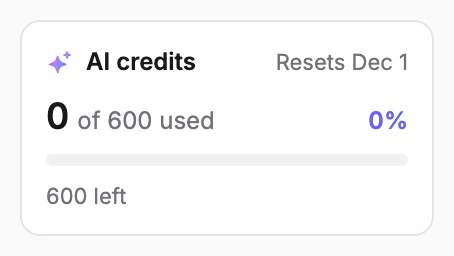
The AI credits card at the bottom of the left sidebar shows how many you have used out of your allowance, how many are left, and when the pool resets (for example "Resets Dec 1"). The bar turns amber at 80% and red when they run out. With the sidebar folded, the card becomes a small ring; hover over it to see the numbers.
Your profile menu. Click your profile picture at the top right. The ✦ pill next to your plan shows the AI credits left this month.
Administration. Admins see the credits with the other usage figures. See Usage stats.
The Enterprise plan has no cap, so the left sidebar doesn't show the card.
See what one answer cost
Every AI answer shows its cost on the row under it, next to the time, for example "4 credits". Hover over it to read "This response used 4 AI credits".
When you run out
- The AI credits card says "Used up · upgrade for more".
- New AI requests stop, including agent runs, and Cloudairy offers you an upgrade.
You can wait for the reset shown on the card, buy a credit pack, upgrade your plan, or add seats on Pro or Business to grow the pool. Click the AI credits card to open the plans. See You ran out of AI credits.
Make your credits last
- Leave the model on Auto, or pick a lighter model for simple jobs.
- Ask for changes in the same chat instead of starting again.
- Be specific in your first request, so you need fewer follow ups.
- For agents on a schedule, choose a sensible frequency. Every few minutes adds up fast.
- For triggers, use a Filter so only the items you care about start the agent.