

You ran out of AI credits
What to do when Cloudairy says "You're out of AI credits this month".
How AI credits work
Every AI action, such as asking Ask AI or generating a diagram, uses AI credits. Your workspace gets a new allowance each month.
| Plan | AI credits |
|---|---|
| Free | 100 a month, one pool for the workspace |
| Pro | 1,000 a month per seat, shared by the team |
| Business | 2,500 a month per seat, shared by the team |
| Enterprise | No cap, you pay for what you use |
When the pool is used up, AI actions stop until it resets, and you see a popup titled You're out of AI credits this month.
Check your credits
The AI credits card at the bottom of the left sidebar shows how many credits you have used, how many are left, and the date they reset. The bar turns amber at 80% and red when the credits are spent.
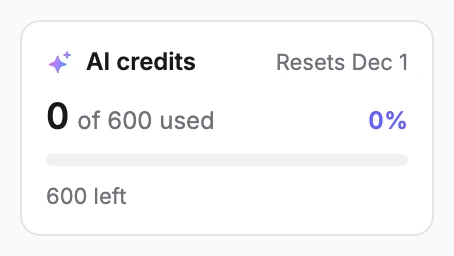
For the full numbers, owners and admins can open Administration from the profile menu, then Usage stats, and read the row AI credits this month.
You can also ask the support assistant: open Ask Support and click How many AI credits do I have left?.
Get more credits
You have three choices.
Wait for the reset. Your monthly allowance comes back on the date shown on the AI credits card.
Buy an extra credit pack (paid plans only).
Click the AI credits card at the bottom of the left sidebar. The Plans and Pricing screen opens.
Scroll to Need extra AI credits?.
Click Buy now on a pack.
| Pack | Price |
|---|---|
| 1,000 credits | $10 |
| 5,000 credits | $45 |
| 10,000 credits | $80 |
| 50,000 credits | $350 |
Bought credits are added straight away. Your plan credits are used first, and bought credits last 12 months. On Free the packs show Paid plans only.
Upgrade your plan. Click Upgrade in the popup to open Plans and Pricing. Pro gives 1,000 credits per seat a month and Business gives 2,500.
Make your credits go further
- Start from a template instead of asking AI to build everything from scratch.
- Give clear, specific prompts so you need fewer retries.
- For simple tasks, use a faster, lighter AI model if your plan offers a choice.